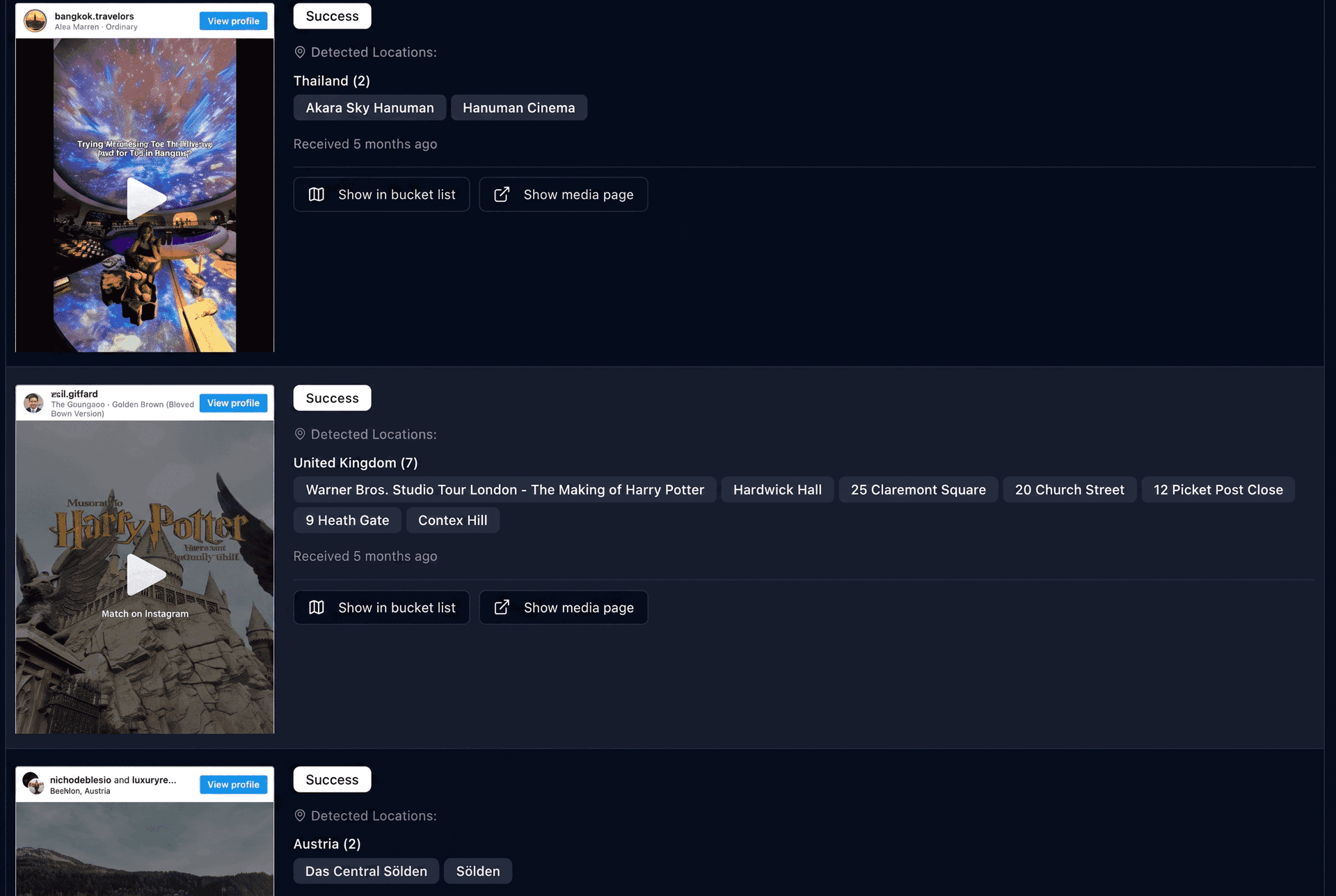
The short answer: saving a reel captures a feeling, not a plan. A saved reel doesn't tell you where the place actually is, whether it fits the trip you're taking, how it connects to your other saved places, or when in your day to go. Turning saves into a real trip means doing four things a folder can't: get every place onto one map, keep only what fits one trip, let geography shape the route, and convert it into a day-by-day itinerary. The free Map Your Voyage planner does exactly that — paste the reels you saved (or shortlist new ones), watch every location land on a map, and click once for a day-by-day, hour-by-hour itinerary.
Everyone has the folder. The little bookmark tab in Instagram, quietly filling with sunset balconies, turquoise coves, hole-in-the-wall noodle bars and that one hotel with the infinity pool. It feels productive. It feels like you're getting somewhere. Then the trip you were planning rolls around, you open the folder, and you're staring at forty videos with no idea where half of them are, which ones are even in the right country, or how any of them fit together. This post is about that gap — why it exists, and the simple method that closes it.
Want to skip the theory? Open the planner, paste the links to the reels you've saved (or shortlist new ones), and watch every location land on one map — then click Create for a day-by-day itinerary. Free and unlimited.
Turn my saved reels into a trip →Why Saving Reels Feels Like Planning
Saving a reel gives you a tiny, real hit of progress. You saw something beautiful, you took an action, and now it's “yours” — filed away, safe, ready for when you need it. Your brain logs that as a step toward the trip, the same way adding an item to a shopping cart feels like buying it.
But a save is a bookmark, not a decision. It records that something caught your eye for a second; it records nothing about whether you'll actually go. And because saving is so frictionless — one double-tap, no thinking — the folder grows far faster than any plan ever could. You end up with a beautiful pile of intentions and zero structure.
Real planning is the opposite of frictionless. It means committing: this place, on this day, reached from that hotel, in an order that doesn't waste half the trip in transit. That work has to happen somewhere — and the saved folder is the one place it can't.
The Four Things a Saved Reel Is Missing
Pull up any reel in your travel folder and ask it four questions. It can't answer a single one — and those four answers are the plan.
1. Where is this, exactly?
Most reels never tag a precise location. You get a vibe, maybe a country, occasionally a city — almost never the actual viewpoint, cove or restaurant you'd need to navigate to. A place you can't point to on a map can't go in an itinerary. (If you're stuck on this, our guide to finding where an Instagram reel was filmed walks through six manual ways and one automatic one.)
2. Does it even fit this trip?
Your folder is a mixtape of every destination you've ever fancied. The Amalfi Coast sits next to a Kyoto temple next to a Patagonia trek. When you're planning ten days in Italy, three-quarters of the folder is noise. A save has no concept of which trip it belongs to.
3. How does it connect to everything else?
Two reels might be a twenty-minute walk apart or a six-hour drive apart, and the folder shows them as identical thumbnails in a vertical scroll. Without seeing your places together on a map, you can't cluster the ones that share a day or spot the lone pin that's blowing your whole route. A flat list hides geography — which is the one thing a route is made of.
4. When do you actually go?
A plan answers “Tuesday morning, then lunch nearby, then the viewpoint at golden hour.” A saved reel answers nothing about sequence, timing or pace. Turning forty places into a sane day-by-day schedule is the hardest part of planning — and it's exactly the part a folder leaves entirely to you.
Location, fit, route, timing. Inspiration is the raw material; a plan is what you get after you supply all four. That's why even a tidy list of saved pins on a map still isn't an itinerary — it answers question one and stops.
The Saved-Folder Graveyard (And Why It Happens)
There's a predictable life cycle to a travel save. It goes: excitement → folder → silence. The reel that made you gasp in October is, by the time you're booking flights in March, a muted thumbnail you can't quite place. Multiply that by dozens and the folder becomes a graveyard of good intentions.
It happens for one structural reason: the effort to save and the effort to plan are wildly mismatched. Saving costs a second. Planning costs an evening — open each reel, squint at the caption, guess the location, search it on a map, figure out which country it's in, decide if it fits your dates, then do it thirty-nine more times and somehow sequence the survivors into days. Nobody does that voluntarily. So the folder just… sits there.
The fix isn't willpower — it's removing the manual work between a save and a plan. If something can pull the location out of the footage, drop it on a map, sort it by country, and build the schedule for you, then the gap shrinks from an evening to a click. Discovery and planning collapse into one motion. That's the whole idea behind Map Your Voyage.
What to Do Instead: 4 Steps
Here's the method, written so it works with any tools — and with a note at each step on where Map Your Voyage does it for you automatically and free.
Step 1 — Get every place onto one map
A reel only becomes useful the moment it turns into a point on a map. You have two on-ramps in the planner:
- Bring your own saves. Paste the links to the reels (or posts, YouTube videos, even travel blog posts) sitting in your folder, and the location of each is detected automatically from the actual footage, the caption and any on-screen text, then dropped on the map. You can also DM reels to Map Your Voyage on Instagram as you scroll, and they file themselves into country-specific bucket lists.
- Or start fresh with curated reels. Pick a country and scroll its hand-picked travel reels, videos and photos — each with a human-verified geolocation — and tap the circle under any you love to drop it straight onto the map. No typing, no guessing.
Either way, the messy folder becomes a set of real pins you can see and work with.
Step 2 — Separate this trip from someday
With everything mapped, the truth is obvious: most folders are three or four different trips wearing one trench coat. Keep the cluster you're actually travelling to — say, Japan this autumn — and let the Portugal and Peru saves rest in their own country buckets for later. In Map Your Voyage, switching countries from the dropdown keeps each destination's places organized, so nothing is lost — it's just sorted into the right trip. (Genuinely going to more than one country? Our guide to planning a multi-country trip covers how many countries actually fit your days.)
Step 3 — Shortlist what fits your days
You can't do twenty places in seven days — not without the trip becoming a forced march. Aim for 5 to 10 places per country: enough to shape real days, few enough to leave room for the unplanned wander that usually becomes the best part. Be ruthless. The places you cut aren't gone; they stay in the bucket list as the seed of your next trip.
Step 4 — Let the map shape the route, then build the itinerary
Look at your pins together and let geography pick the order — one direction, no doubling back. Then comes the step that kills spreadsheets: distributing your places across days, in a sensible sequence, with realistic travel time between them. In Map Your Voyage it's one click — Create — and your shortlist becomes a day-by-day, hour-by-hour itinerary, sequenced so nearby places share a day instead of zig-zagging across town. Want the viewpoint at sunset instead of 9 a.m.? Drag and drop to fine-tune. Building itineraries is free and unlimited, so generate one per variation you're debating and compare.
Paste your saved reels, watch every location land on one map, then click Create — your day-by-day itinerary, free and as many times as you like.
Build my itinerary →Just browsing for now, not ready to commit to one trip? That's what the travel inspiration feed is for — like reels as you scroll and they save into the right country's bucket list automatically, ready to become a plan whenever you are. Think of it as the saved folder, except every save already knows where it is.
A Saved Folder vs a Real Plan
Same reels, two very different outcomes. Here's what each actually gives you:
| What you need | Saved Instagram folder | A real plan (Map Your Voyage) |
|---|---|---|
| Knows where each place is | No — just a thumbnail | Yes — every reel becomes a located pin |
| Sorted by trip / country | No — all destinations mixed | Yes — organized into country buckets |
| Shows how places connect | No — vertical scroll | Yes — all pins on one interactive map |
| Sequences your days | No | Yes — day-by-day, hour-by-hour |
| Effort from you | An evening of research | A few clicks |
| Cost | Free | Free (booking concierge optional) |
The folder isn't the enemy — it's a fine inbox for inspiration. The problem is treating the inbox as the plan. If you like comparing the tools that bridge the two, we've rounded up the best apps to plan trips from social media.
Common Mistakes to Avoid
- Mistaking the inbox for the plan. Saving is collecting inspiration; it's step zero, not step done. Schedule the “turn saves into a map” session like you'd schedule booking flights.
- Saving everything, deciding nothing. A folder of two hundred reels is harder to plan from than a shortlist of fifteen. Curate as you save, or curate ruthlessly when you map.
- Planning one country from a fifteen-country folder. Sort by destination first. Trying to plan a trip while wading through saves from places you're not visiting is pure friction.
- Never extracting the location. A reel you can't place on a map can't enter an itinerary. Get the location early — automatically if you can.
- Skipping the route. Even a perfect list of must-sees becomes a bad trip if you visit them in folder order instead of map order. Let geography sequence the days.
Frequently Asked Questions
Is saving Instagram reels a good way to plan a trip?
Saving reels is great for collecting inspiration, but it isn't planning. A saved reel doesn't record where the place actually is, whether it fits the trip you're taking, how it connects to your other saves, or when in your day to go. Those four things — location, fit, route and timing — are what turn inspiration into a plan, and a flat folder holds none of them. To plan, get every saved place onto a map, keep only what fits one trip, let the map shape the route, and convert it into a day-by-day itinerary.
What should I do with all my saved travel reels?
Get them out of the folder and onto a map. In the free Map Your Voyage planner, paste the links to reels you've saved and each one's location is detected automatically from the footage and caption, then dropped on an interactive map. Group the pins by country, shortlist the ones that fit your trip, and click Create to turn them into a day-by-day itinerary. The saves you don't use stay in a country-specific bucket list for next time.
How do I find the location in a saved Instagram reel?
You can do it manually — read the caption and tagged location, check the on-screen text, reverse-image-search distinctive landmarks, or DM the creator — but the fastest way is automatic. Paste the reel link into Map Your Voyage and the location is detected from the footage, caption and any text in the video, then plotted on a map. Every method is in our guide to finding where an Instagram reel was filmed.
How do I turn saved reels into an actual itinerary?
Put every saved place on one map, keep only the ones in the country or region you're visiting this trip, shortlist 5 to 10 per country, and order them by geography so the route never backtracks. Map Your Voyage does the heavy lifting for free: shortlist places from curated reels or paste your own saved links, watch them collect on one interactive map, and click Create for a day-by-day, hour-by-hour itinerary you can fine-tune by dragging and dropping. The full Instagram workflow is in how to plan trips from Instagram.
Why does my saved travel folder never become a trip?
Because saving is frictionless and planning isn't. A double-tap takes a second; turning fifty saves into a route means finding each location, checking which country it's in, working out what fits your dates, and sequencing it all by hand. That mismatch is where saved folders go to die. The fix is to remove the manual work — let a planner extract the locations, map them, and build the itinerary — so the distance between a save and a plan is one click, not an evening.
Is there a free app to plan a trip from saved reels?
Yes. Map Your Voyage is free for discovering places, building country-specific bucket lists from reels, and generating unlimited day-by-day, hour-by-hour itineraries. Browse curated travel reels and tap to add places, or paste links to reels you've already saved so their locations are detected automatically. You only pay if you choose its optional concierge service to book the trip for you. We compare it with the alternatives in best apps to plan trips from social media.
Can someone just plan and book the trip for me?
Yes. After you build an itinerary from your saved reels, submit your trip requirements — or attach the itinerary you built — and Map Your Voyage's concierge prepares a fully customized trip with hotels, flights and activities booked for you, backed by a price-match guarantee. The quote is free, arrives within 24 hours, and no account is required.
Empty the folder. Build the trip.
Paste the reels you've been hoarding (or shortlist fresh ones), watch every location land on a single interactive map, and turn the whole thing into a day-by-day, hour-by-hour itinerary — free and unlimited. And if you'd rather have humans book the hotels, flights and activities, the concierge quote is free and arrives within 24 hours.