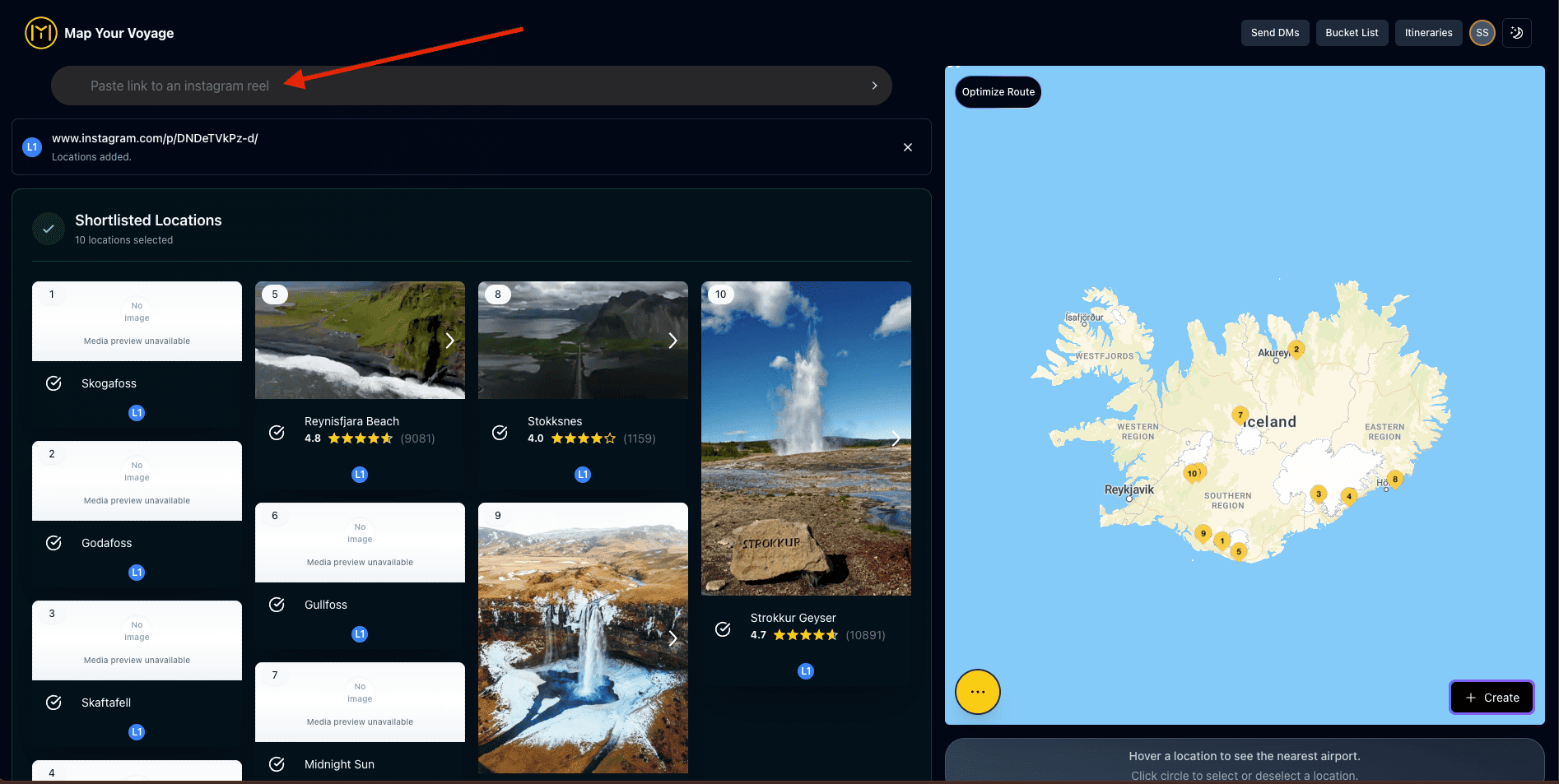
The short answer: for a single reel, check the geotag, the caption and hashtags, and the comments; pause the footage and look for signs and landmarks; run a screenshot through Google Lens; or simply ask the creator. But the fastest way — and the only one that scales past a couple of reels — is automatic: copy the reel link and paste it into the search bar of Map Your Voyage. The locations are extracted from the actual footage, the caption and any text in the footage, then pinned on an interactive map. It is completely free, with no limit on how many links you paste.
This guide covers both routes: the six manual checks worth knowing (they genuinely work for a one-off reel), and the two free automatic ways — pasting links into Map Your Voyage, or DM-ing reels to it on Instagram — that turn “where was this filmed?” from a research project into a two-second copy-paste. By the end, you'll also see how the locations you find become country-by-country bucket lists and, eventually, a day-wise trip itinerary.
Got a reel open right now? Copy its link, paste it into the planner's search bar, and watch its locations land on the map — free, no sign-up gymnastics, as many links as you want.
Find my reel's location →The Short Answer
There are two families of methods for finding where an Instagram reel was filmed:
- Manual detective work — geotag, caption, hashtags, comments, pausing the footage for clues, Google Lens, or asking the creator. Free, and fine for one reel; slow and hit-or-miss for many.
- Automatic extraction — copy the reel link and paste it into the Map Your Voyage planner, or DM it to Map Your Voyage on Instagram. The locations are detected from the actual footage, the caption and any text appearing in the footage, then pinned on an interactive map, listed as text, and filed into country-specific bucket lists. Completely free, unlimited links.
The rest of this guide walks through each method — when it works, when it fails, and how to go from “found it” to “planned the trip.”
The 6 Manual Ways to Find a Reel's Location
These are the checks travelers have always used, roughly in order of effort. For a single reel, start at the top and work down — most reels give up their location by step three.
1. Check the geotag (location tag)
If the creator tagged a location, it appears right below their username (or near the caption on reels). Tap it and Instagram opens a place page showing everything else posted from there. This is the best case — but plenty of reels have no tag at all, and creators often tag a whole city (“Bali”) rather than the actual waterfall, café or viewpoint in the clip. Some deliberately tag vaguely to protect a hidden spot.
2. Read the caption and hashtags
Captions often name the spot outright (“sunrise at Diamond Beach, Nusa Penida”) or hide it in hashtags like #nusapenida or #diamondbeach. Expand the full caption — the location is frequently in the last line, after the emoji. If you get a name, a quick Google or Google Maps search confirms it.
3. Scan the comments
You are rarely the first person to wonder where a reel was filmed. Open the comments and search for replies to “Where is this?” — creators often answer it once and pin it, or another commenter names the place. Thirty seconds in the comments regularly beats ten minutes of reverse-image searching.
4. Pause the footage and hunt for clues
Watch the reel again slowly and pause on anything readable: street signs, storefronts, menus, boat names, license plates, text overlays the creator added, even t-shirts. A single legible café name plus the country is usually enough for Google Maps to pin it. Distinctive landmarks — a rice-terrace pattern, a recognizable bridge, a temple gate — narrow things fast too.
5. Screenshot it and use Google Lens
Take a screenshot of the most distinctive frame and run it through Google Lens (or any reverse image search). For famous landmarks and much-photographed viewpoints this works remarkably well; for an unnamed beach, a generic infinity pool or an interior shot, it usually returns lookalikes rather than the real place. Treat Lens results as a lead to verify, not an answer.
6. Ask the creator
Comment on the reel or send the creator a polite DM. Travel creators answer location questions all the time — it may just take a day or two, and the most-followed accounts may never reply. Worth doing in parallel with the other checks rather than instead of them.
Where the Manual Methods Break Down
All six checks share the same problem: they cost a few minutes per reel, and the answer ends up nowhere useful. Maybe you note it in your phone, maybe you screenshot the comment, maybe you just trust you'll remember. Multiply that by a saved folder with forty reels from Indonesia, Italy and Japan mixed together, and “finding where the reels were filmed” becomes an evening of detective work that produces a messy notes file — no map, no grouping by country, no idea which reel matched which place.
That gap — between identifying one location and collecting all of them somewhere structured — is exactly what the automatic methods below solve. Both are part of Map Your Voyage and free to use — pasting links is unlimited and completely free, and DMs include a free monthly allowance.
Way 1: Paste the Reel Link into Map Your Voyage (Free)
The whole method is one move: copy, paste, done.
- On the reel (or post), tap the Share icon — the paper plane — and tap Copy link.
- Open the Map Your Voyage planner and paste the link into the search bar at the top.
- The reel's locations are extracted and pinned on the interactive map, and listed as text alongside it — no typing, no guessing.
Under the hood, the locations are detected from the actual footage, the caption and any text that appears in the footage — so it works even when the reel has no geotag, or the geotag just says a city. And if one reel covers five spots, you get five pins, not one vague one.
It gets better as you keep pasting:
- Paste as many links as you want — completely free. There is no cap and no paywall on extraction. Work through your entire saved folder in one sitting if you like.
- Every location shows on the map and as text. Your research stops being a notes file and becomes a live, visual map of everywhere your reels were filmed.
- Duplicates are merged intelligently. If the same place appears in three different reels, it shows once on the map — and you can see exactly which reels each location came from. (Three creators filming the same beach is also a strong signal it's worth visiting.)
- Everything is auto-organized into country-specific bucket lists. Paste reels from Bali today and Rome next week — each link and its locations are filed under the right country automatically, so you can come back any time and browse all of your links with locations, grouped by country.
The same search bar also accepts YouTube video links and travel blog-post links, so research from outside Instagram lands on the same map. We compare this approach with other tools in best apps to plan trips from social media.
Try it with the last reel you saved: copy the link, paste it in the search bar, and see where it was filmed — on a real map, in seconds, for free.
Paste a reel link →Way 2: DM the Reel — Without Ever Leaving Instagram
If you do your reel-watching inside Instagram (most of us do), you don't even need to switch apps. After a one-time verification of your Instagram account, you can simply DM reel links to Map Your Voyage as you scroll, and the locations are found for you in the background:
- Verify your Instagram account once. You add a short code to your public Instagram bio to prove the account is yours — no Instagram login, no password sharing, no permissions granted — and you can delete the code as soon as verification completes.
- Found a reel you love? Copy its link and DM it to the Map Your Voyage Instagram account shown during linking. Share → Copy link → paste in the DM → send.
- The locations are detected automatically — from the actual footage, the caption and any text in the footage, exactly like the paste method — and added to your country-specific bucket lists.
Watch Tutorial Video
Watch how to DM a reel link and have its locations saved automatically
The point of this method is flow: you stay in the Instagram app, in bed, on the bus, mid-scroll — and still end up with a structured bucket list of real places instead of a saved folder you'll never decode. Send a reel from Vietnam, one from Greece, one from Portugal; each lands in the right country's bucket list on its own. One tip: always DM the link (via Share → Copy link) rather than forwarding the reel without a URL — the link is what gets parsed reliably. The free plan includes 30 DMs a month (pasting links in the planner stays unlimited and free); a Pro plan makes DMs unlimited. The full workflow, including screenshots, is in our guide to planning trips from Instagram.
From Found Locations to a Day-Wise Itinerary
Finding where reels were filmed is rarely the end goal — the goal is standing there. This is where the bucket lists pay off: everything you pasted or DM-ed has been quietly accumulating, organized by country, with each location tied back to the reels it came from.
When you're ready to actually go:
- Open the bucket list for that country. All your saved reels and their locations are waiting, on a map and as a list.
- Use everything, or shortlist. Build from the entire bucket list, or pick just the locations that still excite you.
- Convert it into a day-wise itinerary. Map Your Voyage sequences your locations into a day-by-day, hour-by-hour plan that's efficient to travel, and you can fine-tune it by drag and drop.
So the reel you found in February becomes a pin in March and an itinerary line-item in June — with zero “wait, where was that waterfall again?” in between. If you'd rather discover places by watching curated reels country-by-country (instead of bringing your own links), that flow is covered in watch Instagram reels and plan a trip — or just browse the destinations grid and dive into any country.
Every Method Compared
All of these work — the difference is effort, reliability when there's no geotag, and whether you end up with anything organized at the end:
| Method | Effort per reel | Works without a geotag? | What you end up with |
|---|---|---|---|
| Geotag / caption / comments | 1–5 minutes | Sometimes | A name you note down yourself |
| Pause footage for clues | 5–10 minutes | Often | A lead to verify on Google Maps |
| Google Lens screenshot | 2–5 minutes | Famous landmarks only | Lookalike matches to check |
| Ask the creator | Days (if they reply) | Yes | An answer in your DMs |
| Paste link into Map Your Voyage | Seconds | Yes — reads footage, caption & on-screen text | Pins on a map + country bucket lists, free |
| DM reel to Map Your Voyage | Seconds, inside Instagram | Yes — same detection as pasting | Country bucket lists, built while you scroll (30 DMs/month free) |
A sensible workflow: use the manual checks when you're curious about one reel mid-scroll, and the paste/DM methods the moment a reel becomes a place you might actually visit.
Frequently Asked Questions
How do you find where an Instagram reel was filmed?
For a single reel: check the geotag under the username, read the caption and hashtags, scan the comments, pause the footage to look for signs and landmarks, run a screenshot through Google Lens, or ask the creator. The fastest way — especially for many reels — is to paste the reel link into Map Your Voyage: the locations are extracted from the actual footage, the caption and any text in the footage, then pinned on an interactive map. Pasting links is unlimited and completely free, and you can DM reels instead if you'd rather stay in Instagram.
Is there a free tool to find locations from Instagram reels?
Yes — Map Your Voyage is completely free. Paste any number of reel or post links into its search bar and each one's locations are detected, plotted on an interactive map, shown as a text list, and organized into country-specific bucket lists. There's no limit on how many links you paste.
Can I find the location of a reel that has no geotag?
Usually, yes. Manually, the caption, comments, on-screen text and visible landmarks are your clues, and Google Lens can identify famous spots from a screenshot. Map Your Voyage does this automatically — it detects locations from the actual footage, the caption and any text appearing in the footage — so a missing or vague geotag isn't a dead end.
What happens when I paste multiple reel links?
Every location from every link lands on the same interactive map and in the same text list. If one place appears in several reels it's shown only once, and you can see which reels each location came from. All your links are also organized into country-specific bucket lists automatically, so you can come back later and browse everything by country.
Can I save reel locations without leaving the Instagram app?
Yes. After a one-time verification of your Instagram account, you can DM reel or post links to the Map Your Voyage Instagram account as you scroll. The locations are detected automatically and filed into your country-specific bucket lists — you never have to leave Instagram while browsing. The free plan includes 30 DMs a month (pasting links in the web planner is always unlimited and free), and a Pro plan makes DMs unlimited.
Do I need to share my Instagram password to verify?
No. You never log in to Instagram through Map Your Voyage or grant any permissions. You verify by adding a short code to your public Instagram bio, and you can remove it as soon as verification completes.
Does it work for posts too, or only reels?
Both — paste or DM links to Instagram reels and posts. The search bar also reads YouTube video links and travel blog-post links, so research from anywhere can land on the same map.
How do I turn the locations I found into an itinerary?
Open the country-specific bucket list where your locations were saved and convert it into a day-by-day, hour-by-hour itinerary. You can use every saved location or shortlist just your favorites — the planner sequences them so each day flows efficiently.
Stop wondering where reels were filmed — start collecting the answers
Paste a reel link and the location appears on a map — unlimited and completely free. DM the next one without leaving Instagram. Every place files itself into a country bucket list, and when you're ready, one click turns that list into a day-wise itinerary.