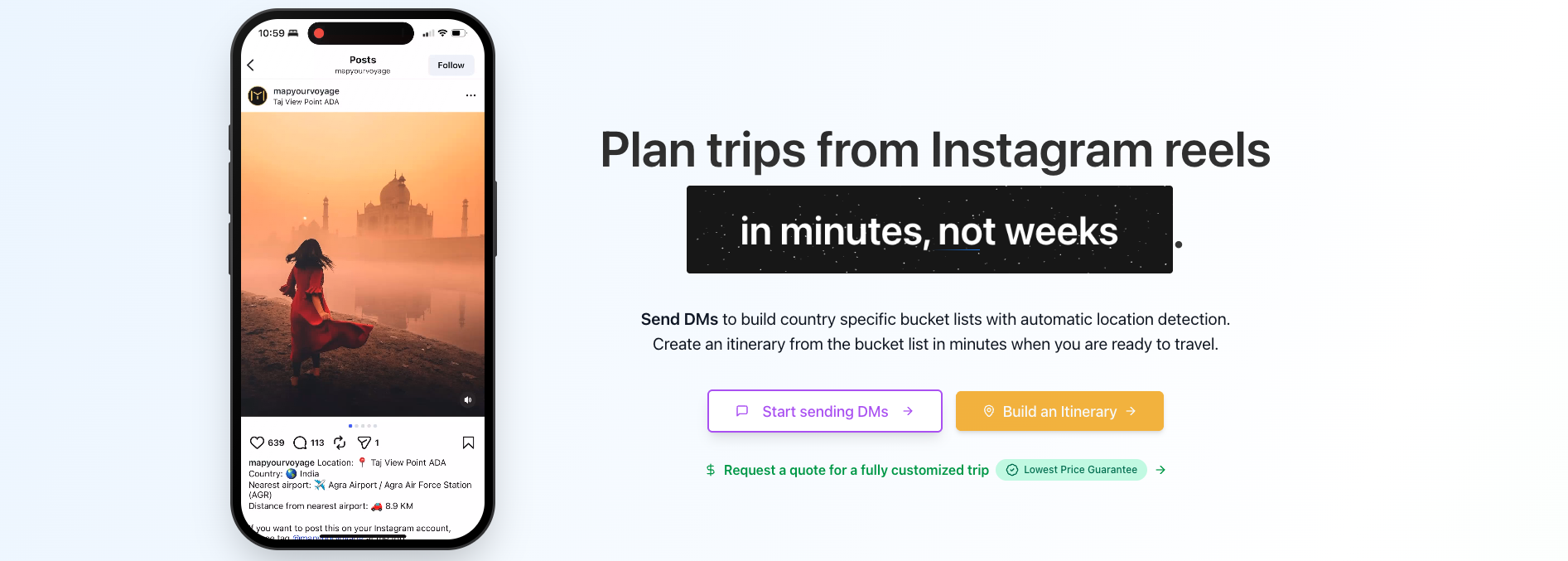
Instagram has quietly become one of the best trip-planning tools out there—if you use it intentionally. Your feed is a living mood board of places you genuinely want to see, cafés you'd actually enjoy, hotels that match your vibe, and little corners of cities that never show up in typical “Top 10” lists.
This article walks through the complete process of planning trips using Instagram—from curating a feed that consistently serves you great travel ideas, to saving posts the right way, to turning scattered inspiration into a real itinerary when you're finally ready to travel.
Already know where you want to go? Skip ahead and start building your itinerary from real travel content in minutes.
Try the travel itinerary planner →Why Plan Trips from Instagram?
Because honestly, who wants an algorithm (or an AI) deciding where you should go—like travel is some bland optimization problem? Your Instagram feed is already hyper-personalized to your taste. Over time, it learns whether you're into mountain towns or beach shacks, street food or fancy tasting menus, boutique stays or hostels, museum-hopping or doing absolutely nothing near a pretty view.
More importantly: we already know what we like. Instead of depending on generic suggestions that could work for “anyone,” planning from Instagram helps you build a trip that feels designed for you—because it kind of was.
There's also a joy in planning that newer AI-first travel tools often flatten. The fun is in the rabbit holes: finding a tiny café on a side street, a weird little bookstore, a quiet viewpoint at sunrise, a boutique stay with character—things that don't always translate into bullet points or rankings. Some places just hit differently, and you only understand why once you're there.
Prerequisites
Before you start planning trips from Instagram, you'll need:
- An Instagram account
- A Map Your Voyage account with a verified Instagram account. This can be achieved through a simple one-time process:
- Signup for Map Your Voyage here
- Verify your Instagram account here. You don't need to log in to your Instagram account or grant any permissions. Verify your account by updating your public bio with a 6-letter code we generate. You can delete the code from your bio once verification is complete.
Watch Tutorial Video
Learn how to verify your Instagram account on Map Your Voyage by adding a 6-letter code to your Instagram bio
Trip Planning Process Overview
The Instagram trip planning process can be split into four steps:
- Discovery Phase — “Training” Instagram to reliably surface high-quality travel content—either globally (when you're undecided) or hyper-relevant to one destination (when you've chosen).
- Inspiration Phase — Capturing “that looks amazing” the moment it happens—and organizing it so future-you can instantly pull up the right ideas when it's time to plan.
- Planning Phase — Turning your country bucket list (built from Instagram links) into a real, day-by-day itinerary using Map Your Voyage.
- Booking Phase — Making all the necessary bookings for your trip: flights, hotels, transport, and experiences.
I. Discovery Phase
A good Discovery Phase setup gives you a steady stream of places you didn't know existed and practical, on-the-ground content that's useful for real trip planning.
Instagram's strongest travel discovery entry points are Explore (for serendipity), Places/Geotags (for specificity), and Accounts.
If You Haven't Picked a Destination
Use this workflow when you're open to anywhere and want your feed to cover the globe.
- Follow the top travel content accounts in the world.10M+ followers: @beautifuldestinations (24.8M) · @earthpix (23.1M) · @wonderful_places (20.1M)1M–10M followers: @discoverearth (6.8M) · @vacations (6.6M) · @travelandleisure (6.5M) · @beautifulhotels (5.9M) · @wanderlust (4.9M) · @earthofficial (4.7M) · @foodandwine (4M) · @michelinguide (3.7M) · @lonelyplanet (3.3M) · @luxuryworldtraveler (3M) · @traveler (2.8M) · @nakedplanet (2.8M) · @wonderful.hotels (2.7M) · @fantastic_earth (2.6M) · @cntraveler (2.4M) · @paradise (2.2M) · @uniquehotels (1.8M) · @tasteinhotels (1.5M) · @hotel (1.5M) · @adventure (1.4M) · @topworldhotel (1M)Under 1M: @discover.hotels (930k) · @best_vacationrentals (900k) · @globehotels (843k) · @smallluxuryhotels (839k) · @luxuryresorts (800k) · @resortstv (652k)
- “Hashtag stalking” still works for browsing—search broad travel hashtags and spend some time scrolling through the content (even though you can't follow hashtags anymore).Travel Inspiration: #travel (791M) · #travelphotography (263M) · #travelgram (191M) · #trip (162M) · #wanderlust (160M) · #instatravel (135M) · #luxurytravel (13M) · #hiddengems (2.8M) · #slowtravel (1.6M)Planning & Tips: #travelblogger (94.7M) · #travelblog (29.9M) · #traveldiaries (20.9M) · #solotravel (11.2M) · #travelguide (6.8M) · #traveltips (5.5M) · #travelhacks (1.1M) · #itinerary (260k)Food & Restaurants: #foodie (273M) · #michelin (30.6M) · #streetfood (17.8M) · #finedining (8.4M) · #michelinstar (3M) · #rooftopbar (1.6M) · #travelfood (1.2M) · #bestrestaurants (639k)Hotels & Stays: #hotel (50.4M) · #staycation (12.6M) · #luxuryhotel (5.2M) · #boutiquehotel (3.8M) · #beautifulhotels (2.3M)Adventure & Outdoors: #adventure (163M) · #naturelovers (143M) · #hiking (90.7M) · #roadtrip (75.1M) · #camping (53.1M) · #nationalpark (10.1M)Specific Experiences: #waterfall (27.6M) · #museum (27.5M) · #theatre (20.7M) · #broadway (7.6M) · #rollercoaster (3.1M) · #infinitypool (1.9M)
- Use Instagram's Explore page (by clicking the Search icon) and deliberately spend time in travel content there—it's designed to surface “next ideas” beyond who you already follow.
- When a post grabs your attention, tap the location/geotag (found below the username for posts or at the bottom of the caption for Reels) and explore that place page—this is one of the fastest ways to jump from “pretty video” to “where is this exactly?”
- Always like posts that grab your attention. This helps the Instagram algorithm understand your preferences and results in similar posts being surfaced in the future.
If You've Picked a Destination
Now the objective changes: make your feed obsessively relevant to the place you're actually planning to visit.
- Use Search → Places (by clicking on search, searching for a place & then clicking on the “Places” tab) and pull up your destination to browse what real people are posting from that location.
- Check both Top posts and recent posts for that place—Top posts often lead you to local photographers/bloggers/influencers whose profiles are worth following for deeper local coverage.
- Follow official tourism-board accounts because many destinations publish practical “what to do / where to eat / where to stay” content (Example: @visitchina, @sydney).
- Use hashtags as a research index, not a feed subscription: search destination/activity hashtags to find creators and locations, then follow the best accounts you discover from there. Examples: #tokyo · #thingstodoinjapan · #traveleurope · #vietnamtrip · #travelguidebali · #balifood · #balihotel · #baliitinerary
II. Inspiration Phase
Watch Tutorial Video
Watch how to send a DM to @0myvo with post/reel links
The purpose here is to save the content you like so that you can find it later when you are ready to plan your trip.
The workflow: Copy the Instagram link of a Reel/post and DM it to the Instagram account shown to you during the Instagram account linking process, so the system can detect locations and file them into your country-specific bucket lists in the Map Your Voyage webapp.
The Core Rule: Send the Link

To make this work reliably, always DM the link to the content (not just “share the Reel” without a URL), because the link is what our system can consistently parse. Instagram supports copying a URL for both posts and Reels via the Share (paper-plane) menu, and that link can then be pasted into a DM.
Step-by-Step (Correct Workflow)
Use these exact steps each time you find something worth saving:
- Open the Reel or post you want to save.
- Tap the Share icon (paper plane).
- Tap Copy link to copy the URL to your clipboard.
- From the Share sheet (or your DMs), search for the Instagram account you were shown during the Map Your Voyage ↔ Instagram linking process.
- Select that account so the message composer opens.
- Paste the copied link into the message box.
- Tap Send.
What Happens After You Send It
When the link is sent correctly, the reel/post can be processed to detect locations and then stored in country-specific bucket lists in your Map Your Voyage account—so later you can jump straight into “Italy” (or any country) instead of digging through an unstructured pile of saved posts. This turns passive scrolling into a searchable library of places you actually want to go.
You can check all the DMs here. You can check your country specific bucket lists here.
Common Mistakes to Avoid
- Sending only the Reel “as a share” without copy/pasting the URL first (your system expects the link).
- Forgetting which account to DM—always use the exact IG account shown during the linking flow.
III. Planning Phase
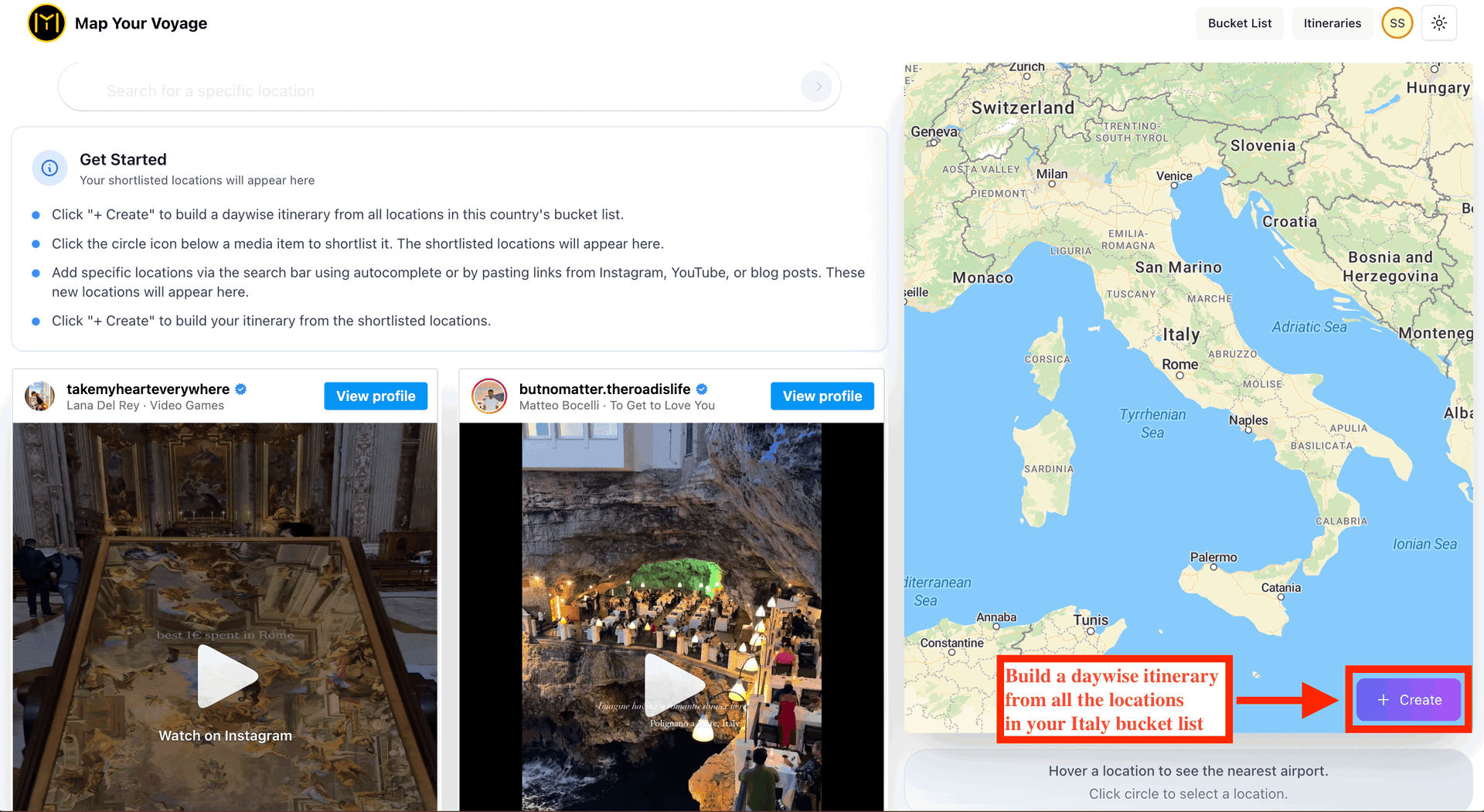
The flow starts by opening the relevant country bucket list, then either generating an itinerary from everything in it or curating a shorter set of posts/locations first.
Start from a Country Bucket List
Open Map Your Voyage Bucket Lists and go to the country-specific bucket list for the place you're ready to visit, where your Instagram-sourced posts should already be organized. This bucket list acts like a “source library” of locations that can be used to generate an itinerary.
Option A: Build from Everything
Use this when your bucket list is still small (or you want an ambitious trip that covers most highlights).
- Open the country bucket list.
- Click “Create” (without selecting any locations) to generate an itinerary using all detected locations from all posts in that country bucket list.
- Once an itinerary is generated, you can also edit it manually. For example, moving an activity from Day 5 to Day 6 by simple drag & drop. You can also add new locations to the itinerary.
Option B: Curate, Then Build
Use this when your bucket list is large, or you want a more focused trip (fewer places, less rushing).
- Open the country bucket list and select a few favorite posts first.
- As you select posts, the extracted locations from those posts should appear in the UI; optionally select/deselect individual locations to fine-tune what makes it into the plan.
- Once you've shortlisted your locations, generate an itinerary from only that curated set.
Ready to turn saved Reels into a day-by-day plan? Open the planner and build your itinerary now.
Build my itinerary →IV. Booking Phase

Booking Phase is where you turn a generated itinerary into confirmed reservations—either by booking everything yourself, or by requesting a free human-assisted quotation from Map Your Voyage and then booking via provided links or through us.
Option 1: Request a Free Quotation
Choose this if you do not have the time to do the research & figure out the bookings by comparing options across multiple sites and tabs.
- Open your generated itinerary and click Request Quotation to get a fully customized quotation covering all the locations.
- You will save days of research time as our team will research hotels, commute/transfers, activities, and flight options aligned with the locations in your itinerary, and then share a quote (in case you want to book through us) as well as booking links (in case you want to book online yourself).
Option 2: Book Everything Yourself
Choose this if you have the time to do deep research on hotels, commute, etc.
- Use the itinerary as your checklist: dates, cities, and the sequence of locations you plan to cover.
- Research and book the components on your own (hotels, local transport/commute, activities/tickets, and flights), keeping everything consistent with your day-by-day plan.
Frequently Asked Questions
Can I plan trips from Instagram Reels?
Yes, you can plan trips from Instagram Reels by copying the link and sending it via DM to the Instagram account shown during the Map Your Voyage Instagram verification process. The system will detect locations from the Reel and add them to your country-specific bucket lists.
How do I save Instagram travel content for trip planning?
Copy the link of any Instagram post or Reel you want to save, then DM it to the Instagram account shown during the Map Your Voyage Instagram verification process. The content will be processed and organized into country-specific bucket lists automatically.
What are the best Instagram accounts to follow for travel inspiration?
Top travel accounts include @beautifuldestinations (24.8M followers), @earthpix (23.1M), @wonderful_places (20.1M), @discoverearth (6.8M), @travelandleisure (6.5M), and @beautifulhotels (5.9M) for global travel inspiration.
How do I turn Instagram saved posts into a travel itinerary?
After sending Instagram links to Map Your Voyage, open your country bucket list and use the itinerary generator. You can build from all saved locations or curate a specific selection for a focused trip.
Do I need to give Map Your Voyage access to my Instagram account?
No, you don't need to log in to Instagram or grant any permissions. Simply add a 6-letter code to your instagram bio to link your account—that's it. Once the accounts are linked, you can delete the code from your bio.
Can I edit the itinerary after it's generated?
Yes, you can fully edit your generated itinerary. Move activities between days with drag and drop, add new locations, remove places, and customize everything to fit your travel style.
Conclusion: Start Planning Your Next Trip from Instagram
Your Instagram feed is already full of places you want to visit. Instead of letting that inspiration get lost in saved posts you never revisit, use Map Your Voyage to turn it into actionable travel plans.
Start by verifying your Instagram account, then send content via DM as you scroll, and when you're ready to travel, you'll have organized bucket lists waiting to become real itineraries.