You found the trip months ago. It is sitting in your saved folder right now — a turquoise cove, a lantern-lit night market, a clifftop road — scattered across a few hundred Instagram Reels and TikToks you will probably never look at again. In 2026 the hard part of travel is not finding inspiration on social media. It is getting it out — turning all that saved content into a list of real places you can actually plan a trip around.
A specific category of app exists to do exactly that: it reads the Reels, TikToks, YouTube videos and blog posts you save, extracts the actual locations, and turns them into a plan. This guide is an exhaustive, researched map of that field — the purpose-built extractors, the well-funded AI planners, the fast-growing challengers, and, just as importantly, the popular apps and AI chatbots that cannot do this at all, no matter how much you wish they could.
A note on scope: this guide is about apps that turn social content into a plan. It is not a review of Instagram, TikTok or YouTube themselves — those are the sources you plan from. If you want pure inspiration sources, see our guide to the best travel inspiration apps; for the full booking toolkit, see the best travel apps to plan and book a whole trip.
Stop letting great places disappear into your saved folder. DM a Reel or paste a YouTube or blog link, get the locations on a country-by-country bucket list, and turn them into a day-by-day itinerary — free.
Plan a trip from your feed →What Makes a Great Social-Media Trip-Planning App?
Dozens of apps now claim to “turn Reels into trips.” They are not equal. Five things separate a tool that genuinely saves you hours from one that adds another folder to ignore — hold every app below up against these.
- It actually reads what you saved. The whole point is automatic extraction — you give it a Reel, TikTok, YouTube video or blog post, and it pulls out the real places. Anything that makes you re-type names by hand is just a planner with extra steps.
- It has minimal friction to capture. The best tool is the one you will actually use mid-scroll. Sending a quick DM without leaving Instagram beats stopping, copying a link, and switching into another app every single time.
- Its locations are accurate. An auto-extracted geotag that lands in the wrong city is worse than nothing. Verified, real, mappable places are what turn a list into a trip.
- It respects your taste. The content you saved already reflects who you are. A great tool plans around your shortlist, not a generic “top 10” that ignores it.
- It bridges to a real itinerary. Extracting places is half the job. The best apps sequence them into a day-by-day plan you can edit and book.
Quick Comparison Table
The apps that genuinely extract locations from social content, at a glance. The “How you add a Reel” column is the one that separates a friction-free habit from a chore. Full write-ups follow.
| App | Reads from | How you add a Reel | Builds full itinerary? | Free tier? |
|---|---|---|---|---|
| Map Your Voyage | Instagram, YouTube, blogs, Maps | DM inside Instagram, or paste a link | Yes — day-by-day + map | Yes |
| Mindtrip | Instagram, TikTok, YouTube | Paste link or screenshot (in app) | Yes — AI itinerary | Freemium |
| Airial Travel | Instagram, TikTok, text | Paste or drop in (in app) | Yes — AI itinerary | Freemium |
| Rhyme | Instagram, TikTok | One-tap save (in app) | Map + guides | Freemium |
| Plotline | TikTok, Reels, YouTube, Maps | iOS share sheet | Saves to map/lists | Freemium |
| DocentPro | Instagram, TikTok | Share to the app | Saves to collection | Freemium |
| ReelTravel | Instagram, TikTok | Share saved Reels (in app) | Yes — itinerary + map | Freemium |
| Triply | Instagram, TikTok, Maps | Share sheet or paste (in app) | Yes — routed days | Freemium |
| ReelTrip | Instagram, TikTok | Paste or share (in app) | Yes — trip plan | Freemium |
Wanderlog, Google Maps, TripIt and AI chatbots are not in this table because they cannot read social content — more on them later.
The Apps That Plan Trips from Social Media
These are the tools built for the one job this guide cares about: taking the content you saved and turning it into real, location-based plans. We start with the most complete and best-funded, then rank the rest by how widely they are actually used — App Store review counts as of June 2026.
1. Map Your Voyage — Best overall, and the only one you feed from inside Instagram
Map Your Voyage is built around the lowest-friction capture in the category. A few things set it apart:
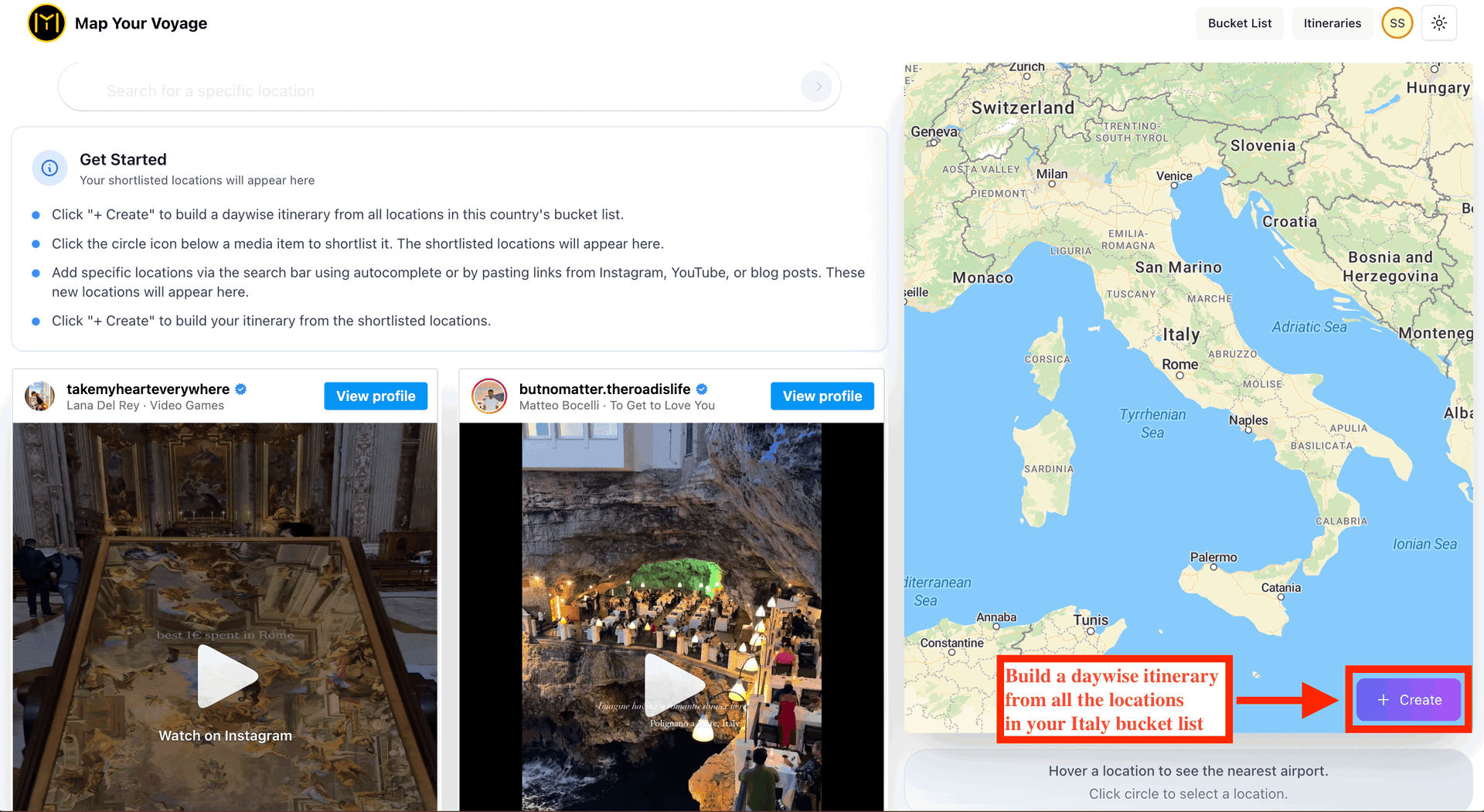
- Save a place without leaving Instagram. This is the part nothing else does. You can DM a Reel straight to the Map Your Voyage Instagram account, and the location is extracted and saved to the right country bucket list — no switching apps, no opening a separate planner mid-scroll. Every other tool here makes you stop and go into their app.
- It also reads YouTube, blogs and Google Maps. Beyond Instagram, you can paste a YouTube video or travel blog-post URL (and Instagram posts and Reels) into the app and it extracts the locations from them too — or search Google right in the bar and add a place straight from the autocomplete results, handy for the long-form research and one-off spots that short clips miss.
- Curated places are human-verified. The travel Reels Map Your Voyage curates for everyone have their locations checked by a real person, so the library you browse is genuinely mappable. The Reels you DM and the links you paste are read by AI and added to your own private bucket list.
- Organized into country bucket lists. Saves sort themselves into country-specific bucket lists, so when you finally commit to Japan, everything Japan is already together.
- One click to a real itinerary. A bucket list becomes a day-by-day, hour-by-hour itinerary that maps and sequences your stops, editable by drag and drop.
It is free to use, with unlimited location extraction from YouTube, Instagram and blogs; the only metered feature is Instagram DMs (30 a month free, unlimited on a low-cost Pro plan). For the full walkthrough, see how to plan trips from Instagram.

Turn the Reels you already love into a trip. DM a post or paste a link, get the location on your bucket list, and build the itinerary when you are ready.
Try the itinerary planner →2. Mindtrip — The most funded player, best for chat-first planning
Mindtrip is the heavyweight of this category. The San Francisco startup has raised over $20 million — backed by Costanoa and Forerunner Ventures, with strategic investment from Capital One Ventures and United Airlines Ventures — and won a Fast Company “Most Innovative” award in 2025. Its “Start Anywhere” feature lets you paste an Instagram, TikTok or YouTube link (or upload a screenshot, photo or PDF) and its AI, grounded in a database of more than 11 million points of interest, extracts the places and builds a full itinerary you refine by chatting.
It is genuinely capable: an interactive map, real-time collaboration, and in-app booking for flights, hotels and activities. Two honest trade-offs are worth knowing. First, on capture friction: importing a Reel means going into Mindtrip to paste the link or share a screenshot — there is no “DM it without leaving Instagram” flow, and its extraction currently leans on TikTok text overlays and YouTube transcripts. Second, it is an AI assistant: you are trusting a model to interpret your taste, and reviewers note it can look confident even when a detail is off, so it pays to fact-check the stops that matter. For a deep dive, see our Mindtrip vs Map Your Voyage comparison.
3. Airial Travel — A funded AI planner that reads your TikToks and Reels
Airial Travel is one of the more serious newcomers. It was built by ex-Meta engineers — one of whom worked on the Instagram Reels team — and raised a $3 million seed round (Montage Ventures, South Park Commons and Peak XV, formerly Sequoia India). You describe a trip in plain text or drop in your favorite travel TikToks and Instagram Reels, and its vision-language models pull out the places and assemble a full, bookable itinerary. In spirit it is closest to Mindtrip — a polished, well-funded AI planner — with a particular bet on creator video as a planning input. Like the other AI planners here, it builds around its own model's reading of your content rather than an in-Instagram capture flow or a human-verified library.
From here, the remaining apps are ordered by how widely they are actually used — roughly by their App Store review counts as of June 2026 — so the most-adopted tools come first.
4. Rhyme (formerly Roamy) — The most-reviewed of the new wave
Rhyme (formerly Roamy) is the breakout hit of this group: one tap pulls every location from an Instagram or TikTok video onto a map, with community-shared guides to browse. It is also, by a wide margin, the most popular extractor here — roughly 4,300 App Store ratings at about 4.8 stars, far ahead of any other indie tool on this list.
5. Plotline — A polished, share-sheet favorite
Plotline auto-extracts places from TikToks, Reels, YouTube videos and Google Maps lists via the iOS share sheet and organizes them onto a map. It is the second most-reviewed newcomer — around 270 App Store ratings at nearly 5 stars — and one of the smoothest options if you live in the iOS share sheet.
6. Smaller and newer extractors
These do the same core job but have far fewer reviews so far, so treat them as promising rather than proven. Listed from most to least reviewed:
- DocentPro — primarily an AI audio tour-guide app, but you can Share → DocentPro to extract places from a post into a travel collection (around 19 App Store ratings).
- ReelTravel — turns your saved Instagram and TikTok Reels into ready-to-use itineraries and maps, finding the exact spots automatically (only a handful of ratings so far).
- Triply — feed it a Reel and it pulls out every place mentioned — restaurants, landmarks, beaches, hotels — and assembles a routed, day-by-day itinerary from what you saved across Instagram, TikTok, Google Maps and screenshots. Capable, but its app is new and has very few reviews yet.
- ReelTrip — a lightweight “turn any Reel into a trip plan” tool (Android, brand-new, with minimal reviews so far).
Most of these are early-stage and iterating quickly, so features and review counts change often. The common gap versus Map Your Voyage: none offer an in-Instagram DM workflow, and none pair extraction with a curated, human-verified travel library.
A note on availability (checked June 2026)
Because this space moves fast, we checked every app's website before publishing — and not all of them are still standing. One name that still circulates on similar lists, Reelstrip, returned errors at every address we tried: its reelstrip.com homepage responds with a “Not Found” error and its other domains no longer resolve, so the product appears to be offline as of June 2026. We have left it out of the comparison rather than send you to a dead link; if it comes back, it belongs with the challengers above. Another name, GoPlaces, is still pre-launch — its site only offers a “join the waitlist” sign-up — so we have held off recommending it until it actually opens to users. We have also reflected a recent rebrand — Roamy now operates as Rhyme — and will keep this guide updated as apps launch, rebrand or shut down.
Popular Apps That Can't Plan Trips from Social Media
This is the part most “best travel app” lists skip. Some of the most popular planning tools in the world — apps you may already use — simply cannot ingest social content. Knowing this saves you the frustration of expecting a feature that is not there.
- Wanderlog. One of the best itinerary builders going — day-by-day schedules, route optimization, group trips — but it has no way to import from a TikTok or Instagram Reel. You watch the video, note the place, switch over, search, and add it by hand, every time. Many travelers pair it with an extractor for exactly this reason; see Wanderlog vs Map Your Voyage.
- Google Maps. Indispensable for saving pins into lists once you know a place's name — but it has no social integration. A Reel of an unnamed waterfall gives it nothing to pin.
- TripIt. Brilliant at building an itinerary from your booking-confirmation emails, but it organizes trips you have already booked; it does not discover or extract anything from social media.
- Tripadvisor & Roadtrippers. Great for reviews and road-trip routing respectively, but both are manual — you bring the place to them, not a Reel.
None of these are bad apps. They are simply built for a different stage — organizing and validating a trip — not for turning a feed of saved videos into a shortlist of real places.
Can AI Chatbots (ChatGPT, Gemini, Claude) Do It?
It is the obvious question in 2026: if AI can write essays and code, surely it can take the Instagram Reel you loved and plan the trip? Paste the link into ChatGPT, Gemini or Claude and ask. The honest, tested answer is no — not in the way you are hoping, and the reasons are not going away soon.
Problem 1: They can't extract the location from a Reel or TikTok link
Drop an Instagram or TikTok URL into a general-purpose chatbot and ask “where is this?” and you will usually get a polite non-answer or a confident guess that is wrong. There are concrete reasons:
- The link is a wall, not a window. Social content sits behind logins and anti-scraping protections, so a chatbot typically cannot even open the post, let alone play the video.
- The location is shown, not written. In most travel Reels the place is communicated visually — a coastline, a temple, a sign that flashes by — or spoken in the voiceover. It is rarely typed out in plain text, and a caption that says “hidden gem in Bali 🌴” is not an address.
- The real answer is often in the comments. Half the time the location only exists because someone asked “where is this??” and the creator replied three comments down — exactly the data a chatbot cannot see.
- A wrong guess is worse than none. Because these models are built to be helpful, they often invent a plausible-sounding place rather than admit they cannot tell — and you discover it was the wrong country deep into planning.
This is not a knock on AI in general — it is a specific limitation of general-purpose chatbots pointed at social links. Closing it takes a system purpose-built for the job, which is exactly what the extractor apps above are. Map Your Voyage, for instance, is purpose-built to read a Reel and pin it to a real, mappable place — and the travel library it curates for everyone is human-verified on top.
Problem 2: They don't know if you're a mountain person or a beach person
Even setting the link problem aside, a chatbot has a deeper blind spot: it does not know you. It starts every conversation from a blank slate. It has no idea that you skip every crowded beach for a quiet trailhead, that you would rather eat at a street cart than a tasting menu, that boutique guesthouses make you happy and giant resorts make you miserable. So it gives you the safe, average answer — the same “top 10” a million other people get.
Your social feed knows all of it. That is the whole argument for planning from your feed instead of from a blank box — and it is important enough to get its own section next.
Where AI chatbots actually help
To be fair, because fairness is what makes the rest credible: ChatGPT, Gemini and Claude are genuinely useful in travel — once you already know where you are going. They are great for drafting a rough day structure, answering logistics questions (“how many days for Kyoto?”), summarizing visa rules, or rewriting a packing list. Use them as a smart assistant for the trip you have already shaped. Just do not expect them to watch your Reels or read your mind — that is a different job, and a different kind of tool.
Why Your Instagram Feed Is the Ultimate Trip Planner
Here is the idea at the heart of this whole guide, and it is worth saying plainly:
Your Instagram feed is already hyper-personalized to your taste and understands what kind of places you like. AI chatbots don't have access to this personalized data and can't surface travel plans tailored to you like Instagram can. Why let an algorithm decide where you should go when your feed already knows your style?
Think about how much your feed has quietly learned. Every time you lingered on a misty mountain village instead of a party beach, every café you double-tapped, every boutique stay you saved and every fast scroll past a crowded landmark — all of it trained an algorithm to understand your travel personality better than you could put into words. Your feed is, in effect, a recommendation engine that has been studying you for years.
A chatbot has none of that. Ask it to plan your trip and it optimizes for the average traveler, because the average is all it has. There is also a quieter loss: the joy of planning — the rabbit holes, the tiny side-street bookshop, the sunrise viewpoint, the place that just hits different for reasons you only understand once you are standing there.
The smart move is not to fight your feed or replace it with AI — it is to harness it. Let the algorithm that already knows you do the discovery, and use a tool that captures those places, pins them to real locations on a map and turns them into a plan. That is the entire premise of Map Your Voyage: your taste does the choosing, and the app does the logistics.
How to Plan a Trip from Social Media (Step by Step)
You do not need a complicated system — just a habit that keeps the good ideas and quietly drops the friction. This five-step routine is how a feed full of dreams becomes a trip on the calendar.
- Let your feed do the discovery. Keep scrolling the platform you love. Like and watch travel content so the algorithm sharpens its read on your taste and surfaces more places that genuinely fit it.
- Capture the place, not just the post. The instant a Reel makes you say “I have to go there,” save the real location — not a bookmark you will never decode later.
- Send it to a tool that extracts the location. In Map Your Voyage you can link your Instagram once (just a 6-letter code in your bio — no login, no permissions), then DM any Reel to its account, or paste a YouTube or blog-post link into the app. The locations are detected and filed automatically.
- Organize by destination. Let everything sort into country-specific bucket lists so that when you finally commit to Japan, everything you ever loved about Japan is already in one place.
- Generate a day-by-day itinerary. Open the destination's bucket list and build a plan from your saved locations — mapped, sequenced across days and hours, editable by drag and drop — then book it yourself or request a free quote.
Which App Should You Use? (by traveler type)
- The Reel hoarder who lives in Instagram. You save constantly and want zero friction. Map Your Voyage — DM Reels without leaving Instagram, get the locations mapped and a real itinerary.
- The chat-first planner. You enjoy brainstorming with an AI and want a data-rich first draft. Mindtrip is the most polished option, with Airial Travel — another well-funded, ex-Meta team — a close second.
- The “dump everything on a map” type. You want every place from a video extracted automatically. Map Your Voyage does it from Reels you DM and from YouTube or blog links; Rhyme and Plotline are the most-used alternatives.
- The iOS share-sheet power user. You want to share from any app in one tap. Plotline or Rhyme.
- The spreadsheet organizer. You already know the destination and just want it tidy. Wanderlog or Google Maps lists — paired with an extractor for the discovery half.
The winning setup for most people is a pair: your feed to spark the ideas, and one tool to capture and plan them. Discover on the apps you already scroll — then let Map Your Voyage make sure none of it slips away.
Frequently Asked Questions
What is the best app to plan trips from social media?
Map Your Voyage is the best all-round pick: DM an Instagram Reel without leaving Instagram or paste a YouTube or blog-post link, it extracts the location, files it into a country bucket list, and builds a day-by-day itinerary. Mindtrip is the most funded alternative for chat-first AI planning, and Airial Travel, Rhyme, Plotline and ReelTravel are strong newer extractors.
Which apps can extract locations from Instagram Reels and TikToks?
Apps purpose-built for this include Map Your Voyage (Instagram, YouTube, blogs and Maps), Mindtrip (Instagram, TikTok, YouTube and screenshots), Airial Travel, Rhyme, Plotline, DocentPro, ReelTravel and Triply. Popular planners like Wanderlog, Google Maps and TripIt cannot — they need you to type each place in by hand.
Can AI chatbots like ChatGPT, Gemini or Claude plan a trip from an Instagram or TikTok link?
Not reliably. General-purpose chatbots usually cannot open a social link, watch the video and identify the exact place, because the location is shown visually or buried in the comments rather than written in plain text, and the content often sits behind a login wall. They also have no access to your personal feed, so they cannot tell whether you prefer mountains or beaches. They are useful for drafting a rough plan once you know where you are going — not for extracting real locations from your saves.
What is the difference between Map Your Voyage and Mindtrip?
Both extract locations from social content, but the workflow differs. Map Your Voyage lets you DM an Instagram Reel straight to its account without leaving Instagram, extracts the location, and also reads YouTube and blog-post links (its curated reels are human-verified). Mindtrip is a chat-first AI planner that imports pasted links or screenshots from inside its own app and is the most funded player in the space. Map Your Voyage optimizes for in-Instagram convenience and a human-verified curated library; Mindtrip optimizes for a data-rich AI assistant you converse with.
Can Wanderlog import places from Instagram or TikTok?
No. Wanderlog is an excellent itinerary builder with day-by-day schedules and route optimization, but it cannot import places from a TikTok or Instagram Reel — every place has to be watched, noted and typed in by hand. For automatic extraction you need a tool like Map Your Voyage, Mindtrip or Triply, which many travelers pair with Wanderlog.
Do I need to give an app access to my social media accounts?
With Map Your Voyage, no. You never log in to Instagram through the app or grant any permissions. You link your account by adding a 6-letter code to your public Instagram bio, which you can delete once verification is complete. After that you simply DM Reels you like, or paste YouTube and blog links.
Your feed already found the trip — now keep it
Whichever app you choose, the goal is the same: stop letting great places slip away. Map Your Voyage is the only one you feed from inside Instagram — DM a Reel or paste a YouTube or blog link, get your locations on a country-by-country bucket list, and turn them into a day-by-day itinerary. No app-switching, no generic guesses — a trip that is actually yours.