You have a list of places you want to visit — a dozen viewpoints from saved Reels, a handful of restaurants a friend recommended, two or three cities, a national park. The moment you try to drop them all on a map and figure out the smartest order to visit them, you hit a wall: most popular tools either cap how many points you can add, hide route optimization behind a paywall, or do not optimize at all.
This guide is a researched, no-fluff comparison of the best apps to plot multiple locations on a map and create an optimized route in 2026. We will cover their real limits (including the well-known Google Maps 10-stop cap), which ones support unlimited points, the difference between road routing and straight-line routing, and which tool fits which job.
Planning a trip across several cities or countries? Plot unlimited locations on a map, optimize the order, and turn it into a day-by-day itinerary — free.
Plot & optimize my route →What to Look For in a Map Route Planner
“Plot locations and make a route” sounds like one feature, but it is really four, and most tools are strong at one or two and weak at the rest:
- How many points you can plot. Some tools cap you at 10, some at 25, some go to thousands, and a few are genuinely unlimited.
- Whether it optimizes the order. Plotting pins is easy. Reordering them into the shortest, most efficient sequence is the hard part — and many “map” tools do not do it at all.
- Road routing vs straight-line routing. Driving planners calculate real turn-by-turn road distances. Trip-level planners often use straight-line (point-to-point) distances, which is the right model when you fly or take trains between stops.
- Whether it becomes a real plan. An optimized route is just an ordering. The most useful tools turn it into a day-by-day, hour-by-hour itinerary you can actually follow.
Keep these four in mind as you read — the “best” app depends entirely on which of them matters most for your trip.
The Google Maps 10-Stop Problem
Google Maps is the default for almost everyone, so it is worth being precise about its limits. The consumer Google Maps route planner allows a maximum of 10 stops (waypoints) per route — on both desktop and mobile. Try to add an 11th and it simply will not let you.
That is fine for a quick errand run, but it falls apart the moment you are planning anything ambitious: a two-week road trip, a multi-city Europe itinerary, or a day packed with 15 saved attractions. The common workarounds are clumsy — you either split the trip into several separate Google Maps routes and stitch them together manually, or you use a third-party tool that chains multiple Google Maps pages to reach ~25 stops.
There is a second, quieter limitation: even within those 10 stops, Google Maps does only light optimization. It will let you drag stops to reorder them and can suggest a reasonable order, but it is not built to solve for the genuinely shortest tour across many points. For that, you need a dedicated optimizer.
Note for developers: the limits above are for the consumer app. The Google Maps Directions API supports up to 25 waypoints per request, and the newer Routes API can optimize up to roughly 98 waypoints using coordinates — but that is code, not the app most travelers use.
Quick Comparison Table
Here is the short version. Details and caveats for each tool are in the reviews below.
| App | Points you can plot | Optimizes order? | Route type | Best for |
|---|---|---|---|---|
| Google Maps | 10 max | Light | Road | Quick everyday navigation |
| Google My Maps | Up to 10,000 | No | Road / manual | Visual plotting, no optimization |
| Map Your Voyage | Unlimited | Yes | Straight-line + real Google Maps routes per day | Multi-country trips & itineraries |
| Wanderlog | Unlimited (free) | Yes | Road | Road trips & vacation planning |
| Furkot | Unlimited | Yes | Road | Detailed road-trip routing |
| RouteXL | 20 free / more paid | Yes | Road | Small delivery / errand runs |
| MyRouteOnline | Up to 1,000 | Yes | Road | Bulk address routing |
| Maptive | Thousands (25/route) | Yes | Road | Business mapping & analytics |
| Roadtrippers | 7 free / 150 paid | Yes | Road | Scenic US road trips |
| Travellerspoint | Unlimited | No | Straight-line | Mapping & sharing past travels |
Limits reflect publicly documented free-tier behavior at the time of writing and can change; check each provider for current numbers.
The Best Apps, Reviewed
1. Google Maps
The universal default. Excellent live traffic, the best place database, and turn-by-turn navigation everyone already knows. As covered above, its weakness is the 10-stop ceiling and only light reordering. If your trip is small and you mainly want directions, it is hard to beat. If you have more than 10 stops or want true optimization, you will outgrow it fast.
2. Google My Maps
The lesser-known sibling of Google Maps, built for custom maps. You can plot up to 10,000 points, organize them into color-coded layers, and save the map for later. The catch: My Maps does not optimize routes at all — no smart reordering, no shortest-tour solving, and no live navigation. It is a brilliant canvas for plotting, but you are on your own for the routing. We compare it with Map Your Voyage head-to-head in Google My Maps vs Map Your Voyage.
Want unlimited points and route optimization in one place — without a spreadsheet or a paywall?
Try Map Your Voyage free →3. Map Your Voyage (best for multi-country trips)
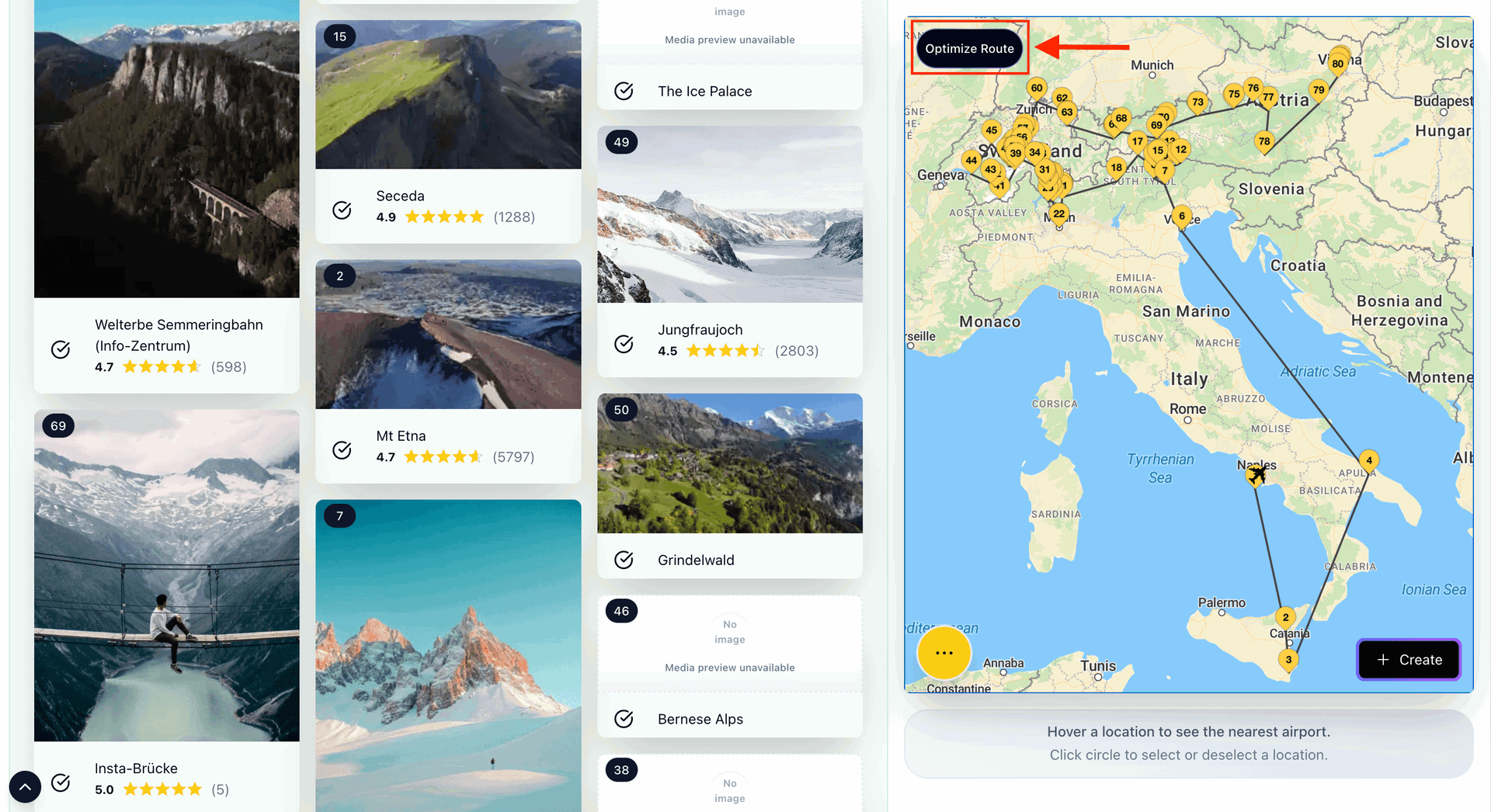
Map Your Voyage is built for the exact gap the tools above leave open: plotting an unlimited number of locations on a map and optimizing the visiting order, then turning that into a real itinerary. You shortlist places from curated, human-verified travel content (including Instagram Reels and posts), and every selected location lands on an interactive map. There is no 10-stop wall and no “upgrade to add more” prompt.
It is also one of the few planners designed for trips that span multiple countries in a single session — select spots in one country, switch countries from a dropdown, keep adding, and watch them all collect on one map. You can also search for any location and add it from autocomplete suggestions — exactly like Google Maps, but with no restrictions and completely free — so nothing you want to visit is ever off-limits. When you are ready, one click builds a day-by-day, hour-by-hour itinerary that sequences your stops efficiently, which you can then edit by drag and drop.
For long trips, you can even set an airport as your starting point, which makes the plan realistic when you are arriving into a country and working outward across dozens — or hundreds — of locations.
About the straight-line routes: while you are plotting and shortlisting, Map Your Voyage connects your points with straight (point-to-point) lines rather than turn-by-turn driving routes. That is the right model for the planning stage of a multi-city, multi-country trip — where the legs between hubs are flights or trains, not a continuous drive, and you want to scale to unlimited points without hitting a wall. The important part most comparisons miss: once your itinerary is built and split into days, you can open the real Google Maps route for each day — and between any two locations — with a single click. So you get the unlimited-points planning view and real road navigation when it actually matters. More on this distinction in the next section.
4. Wanderlog
A popular option for vacation and road-trip planning. Wanderlog lets you add unlimited stops for free, plots them on a travel map, and includes a one-tap route optimizer that rearranges your stops to cut travel time. It also bundles collaborative itineraries, reservations and notes — a capable all-rounder for driving-based trips.
5. Furkot
The power user's road-trip planner. Furkot supports unlimited stops, plans routes automatically (or lets you shape them by hand), and finds attractions, hotels and fuel stops along the way. Its optimization has been reported to cut driving distance by up to 30% on poorly ordered trips. Deep controls for speed, road type and daily driving limits make it ideal for serious overland journeys — at the cost of a steeper learning curve.
6. RouteXL
A focused, no-frills optimizer aimed at deliveries and errand runs. RouteXL sorts your stops into the fastest order and is free for up to 20 addresses (more on paid plans). Great for a courier-style loop; not built for trip discovery or itineraries.
7. MyRouteOnline
A heavier-duty planner that accepts imported address lists and optimizes routes of up to 1,000 stops by time, distance, or both. Best for businesses and anyone routing a large batch of addresses; overkill for a typical vacation.
8. Maptive
A business-grade mapping platform. You can plot thousands of points from a spreadsheet and optimize routes of up to 25 locations, with strong heat-mapping and territory/analytics tools layered on top. Powerful for sales and logistics teams; more than most travelers need.
9. Roadtrippers
Beloved for discovering quirky stops and scenic detours on US road trips. Note the limit, though: the free plan caps you at 7 waypoints, and you must upgrade to Roadtrippers Plus (up to 150 stops) to plan anything larger. Best for experience-led American road trips rather than dense multi-stop optimization.
10. Travellerspoint
A free travel-map tool with unlimited stops, great for visualizing and sharing a trip (or a lifetime of travels) on one map with custom colors and transport modes. It maps and displays routes beautifully but does not optimize the order — think storytelling and sharing rather than efficiency.
Honorable mentions: Mappr (AI travel-map planner you describe in plain English), myscenicdrives and TravelMap for road-trip and itinerary visualization.
Road Routes vs Straight-Line Routes
This is the distinction that decides which tool you actually need, and most comparison posts skip it.
- Road (driving) routes follow real streets and highways, accounting for one-way roads, turns and traffic. They are essential when you are physically driving a car between every stop. The price you pay is stricter limits — road routing is computationally heavy, which is part of why so many driving planners cap stops or charge for more.
- Straight-line (point-to-point) routes connect stops with direct lines and optimize the order using as-the-crow-flies distance. This is the natural model for trip-level planning across cities and countries, where the between-stops legs are flights or trains, not a continuous drive — and it scales effortlessly to unlimited points.
In practice you often want both, at different stages. For a broad trip — many cities, several countries, dozens of saved spots — straight-line planning is faster, cleaner and unconstrained by stop limits while you decide what and in which order to visit. Map Your Voyage gives you that planning view with unlimited points, and then — once the trip is split into days — lets you open the real Google Maps route for each day, and between any two stops, so you get turn-by-turn road navigation exactly where it is useful. Dedicated driving planners such as Furkot or Wanderlog are a good fit if your whole trip is a single, continuous road trip in one vehicle.
Why does optimizing the order matter so much? Because it is the Travelling Salesman Problem, which becomes impossible to eyeball as stops grow. With just 10 stops there are over 300,000 possible orderings; good route software finds a near-optimal one in a second, and the resulting plan is routinely ~20% shorter than a hand-ordered one.
How to Plot Locations and Optimize a Route (in Minutes)
The workflow is the same regardless of tool. Here is how to do it end-to-end with Map Your Voyage, since it removes the stop limit and ends with an actual itinerary:
- Collect your locations. Open the travel itinerary planner and browse curated, human-verified travel content. Shortlist every place that appeals to you by tapping the circle icon below each Reel, video or photo.
- Plot the points on a map. Each place you select drops onto the interactive map instantly — across as many countries as you like, with no 10-stop ceiling. Switch countries from the dropdown and keep adding. Prefer to type? Search for any place and add it straight from the autocomplete suggestions, just like Google Maps. You can also set an airport as your starting point.
- Optimize the order. Build the itinerary and the stops are sequenced into an efficient visiting order rather than a random pile of pins.
- Turn it into a real plan. You get a day-by-day, hour-by-hour itinerary you can fine-tune with drag and drop — moving an activity from Day 5 to Day 6, adding or removing stops, and shaping it to your pace. From there you can open the real Google Maps route for each day, and between any two locations, for turn-by-turn navigation.
No spreadsheets, no manual address entry, no stitching multiple map pages together.
Which Tool Should You Pick?
- Quick directions, a few stops: Google Maps.
- Plot a lot of pins on one map: Map Your Voyage (unlimited points, optimization, and a real itinerary), or Google My Maps / Travellerspoint if you just want a static map with no optimization.
- A driving road trip with turn-by-turn routing: Furkot or Wanderlog.
- Deliveries or bulk address routing: RouteXL, MyRouteOnline or Maptive.
- A multi-city or multi-country trip with unlimited points, optimization, and a real itinerary: Map Your Voyage.
Stop fighting the 10-stop limit. Plot unlimited locations across any countries, optimize the order, and get a day-by-day itinerary — free.
Plot & optimize my route →Frequently Asked Questions
What is the best app to plot multiple locations on a map?
For plotting an unlimited number of locations on a map and optimizing the visiting order — including across multiple countries — Map Your Voyage is the best choice, because it also turns those points into a day-by-day itinerary and lets you open the real Google Maps route for each day. Google My Maps can plot up to 10,000 points but offers no optimization, while Wanderlog and Furkot are good options for single driving road trips.
How many stops can you add to a Google Maps route?
The consumer Google Maps route planner is limited to 10 stops per route on both desktop and mobile. To go beyond that you need a different tool, or you have to split your trip into several separate Google Maps routes.
Which route planner apps allow unlimited stops?
Map Your Voyage lets you plot unlimited points across multiple countries for free, optimize the order, and build a day-by-day itinerary. Wanderlog and Furkot also offer unlimited stops with optimization on their free tiers, and MyRouteOnline supports up to 1,000 stops. Travellerspoint allows unlimited stops too, but does not optimize the order.
What is route optimization?
Route optimization reorders a list of stops into the most efficient visiting sequence so you cover the least distance. It is based on the Travelling Salesman Problem — with just 10 stops there are over 300,000 possible orderings, so software is needed to find a near-optimal route quickly. Optimized routes are routinely around 20% shorter than hand-ordered ones.
Does Map Your Voyage use real road routes?
While you plot and shortlist locations, Map Your Voyage shows straight-line (point-to-point) routes, which is ideal for multi-country and multi-city planning with unlimited points. Once your itinerary is built and split into days, you can open the real Google Maps route for each day — and between any two locations — for turn-by-turn road navigation. So you get the unlimited-points planning view and real road routing where it matters.
Can I plot locations across multiple countries on one map?
Yes. Most driving planners are built around a single continuous route, but Map Your Voyage is designed for multi-country planning — select spots in one country, switch countries from a dropdown, keep adding, and see them all collect on one map before building a combined itinerary.
Conclusion: Pick the Right Tool for the Job
Plotting locations on a map is easy; optimizing the route and turning it into a plan is where tools separate. Google Maps stops at 10 waypoints, My Maps plots thousands but optimizes none, driving planners like Wanderlog and Furkot nail single road trips, and business tools like Maptive and MyRouteOnline handle bulk addresses.
If your trip spans many places — or many countries — and you want unlimited points, an optimized order, and a real day-by-day itinerary without hitting a paywall, Map Your Voyage is built for exactly that.